maandag 19 oktober 2009

TPACK combined with the topics of the course -- Added value of TPACK?

When reading through my posts of the last weeks, I noticed that previous topics prepared the understanding of TPACK (which stands for Technological Pedagagogical Content Knowledge --> I explained this framework in the previous post). In the course (Pedagogies for Flexible Learning supported by Technology) the topic Flexibility was one of the first topics. I posted a post on this webblog about different kinds of flexibile learning. After describing and understanding the different kinds of flexible learning, there was a lecture about different kinds of pedagogical approaches, I also described a few pedagogical approaches on this webblog. Describing those approaches (and before that, forms of flexibility) gave me a good overview of the possibilities of flexibile learning and the variation of different pedagogical approaches. During the lectures those two topics were linked with Technology. We got educated about different kinds of technology which can support (flexible) learning. Reflecting on this process the next step was to find out how those three aspects could be combined. I wrote a post on this webblog in which I reflected on the combination of flexible learning, pedagogies and technology. After writing this, the TPACK model was presented; during last lecture. The post in which I reflected on combining flexible learning, pedagogies and technology was therefore a nice preparation for understanding TPACK. This way all the previous posts prepared me to understand TPACK better, because I already got the chance to think about the topics myself and how to combine it.

As said in the previous post about TPACK, the framework is meant for the teacher. It has a teachers-view instead of a student-view. Whether TPACK can be reached depends on the knowledge the teacher has on the three concepts; technology, pedagogies and the content. According to Harris, Mishra and Koehler (2009) approaches that teach only skills (technological skills for teachers, or other skills for teachers) are insufficient. Learning about technology is different than learning what to do with it instructionally. Teaching technology skills (to teachers) does little to help teachers develop knowledge about how to use technology to teach more effectively; Technological Pedagogical knowledge (TPK) (Harris, Mishra & Koehler, 2009). Only learning how the technology works does not automatically mean that teachers are able to use the technology in a effective way combined with pedagogies, but also in relationship with the content (TCK) and the context. Every teacher can have their own way of using TPACK. One teacher will integrate technology by letting students use the internet to find sources, while another teacher will let students develop their own websites about topics concerning the content. Some teachers will decide that they want to use the Witheboard (once they know how to work with it), and then decide which content and pedagogical approach fits best with this technology. Other teachers want to teach content which can be supported by technology, for example with the digital Whiteboard (Example: When the content is about Vulcanos, for example within the subject Geography, a possible way to support this with technology is to show a simulation on the Whiteboard of a working Vulcano, or letting students use the Whiteboard to make a working vulcano (putting the right aspects on the right places). Another teacher can choose to start with a certain pedagogical approach, for example; inquiry learning. Technology can in that case be used for example, to let students look up information on the internet about the working of Vulcano's.


It should be clear that there is a clear relation between the concepts that are presented within the course Pedagogies for Flexible learning supported by Technology (flexible learning, pedagogical approaches and kinds of technology for support). The possibility of using different pedagogical approaches and the different ways those pedagogies (and the content) can be supported by technologies can lead to flexible learning. It can lead to flexible learning because technologies can provide in flexibility (communicating through internet, or using new kinds of learning by using technologies such as GPS, Ipods, Course Management Systems, camera's, etc.) The pedagogical approach does also relate to the amount of flexibility. In certain approaches students have to explore the content themselves, or with each other, this can provide the flexibility of a course. It is the same with TPACK; the relation between technological pedagogical and content knowledge within the context can lead to more flexibility in learning. Therefore I think flexibility by trying to reach TPACK is one of the added values of TPACK.
TPACK is most helpful when not described in isolation from techniques for developing it (Harris, Mishra & Koehler, 2009). It is about the interaction between technological, pedagogical and content knowledge. Those aspects have to interact and not used isolated. When teachers learn how to work with certain technologies it should be combined with pedagogical knowledge and the use of technology for transferring the content knowledge, otherwise TPACK can not be reached. In that case the aspects are isolated and don't support each other. For example; when a technology is chosen which does not support the content and the pedagogical approach, then the use of the technology has no additional value. To get a possitive effect of TPACK it is highly important that all aspects interact and addition each other.
Althoug TPACK does refer to the teachers knowledge, it is not a professional development model; TPACK is framework for teacher knowledge (on technology, pedagogies and the content) (Harris, Mishra & Koehler, 2009). The TPACK framework does not specify how this should be accomplished. There are many possible ways to develop knowledge of those three aspects for teachers. Koehler & Mishra (2005) have explored learning-by-desing approaches to the development of TPACK, teacher learn how to use the factors of TPACK by desiging their courses from this perspective. Before teachers can develop and use TPACK they have to be aware of the all the possible learning activities. Harris, Mishra & Koehler (2009) write in their article about different support activities, they divide learning activitiy types into:
- Knowledge-building Activity Types
- Convergent Knowledge Expression Activity Types
- Divergent Knowledge Expression Activity Types

Harris, Mishra & Koehler have linked those Knowledge Activity Types to technologies that are able to support these activity types. This provides teachers in knowledge about the possible ways of using technology integrated with the content and the pedagogical approach which lead to a flexible learning environment. By using the activity types teachers can find out new technological approaches to support their content and get new ideas about their pedagogical approach because of this. Personally I think such a kind of support can lead to new insights and new ideas about teaching. A lot of teachers want to use new technologies and want to know what the value of it is. By providing them with those information they get support to use it. When a teacher does not know that it is possible to use GPS for their Geography content, they will never use it. When they learn that it can be used in the Geography lessons and when they learn how to use it in their lessons --> not only how the technology works, but also how it can be usefull in the course and which pedagogies can be used to get the best benefit out of it -- then they can also adjust their pedagogies on it. Using GPS does not have so much effort when the students have to sit in their chairs and are not aloud to go outside to explore how it works; inquiry learning seems to be a better approach then. Collabaritve learning can also be practical when such technology is used to learn the content to the learners.

Conclusion
The given examples show that the relation between technology, pedagogies and the content (and context: the cirkel around the three aspects of TPACK) not only provide the flexibility of a course, but also show the importance for teachers to see the link between the use of technology, the choice of pedagogical appraoches (also the way the course is organiste) to teach the content of the course to the learners. When they don't see the link/connection, then using technology in teaching has no furhter value. When teachers are aware of this, they have to learn how to work with it. Not only with the technologies but specially with combining technology with a propriate pedagogical approach and with content for which using technology is important (or the other way around of course; the starting point can be different). Teachers need to have Pedagogical knowledge (this helps them in their teaching), teachers need to have knowledge about the content (otherwise they can not teach about the content), and teachers need to have knowledge about technologies (as well as what technologies there are, how they work, and most important how to integrate them with the content and the pedagogies) Therefore I believe TPACK does have a additional value. The trick is to integrate the three different cirkels well. As pointed out in the previous post about TPACK, this is not easy to accomplish. This is why I think the Knowledge Activity Types of Harris, Mishra & Koehler, 2009 really can support teachers in this process. When teachers become aware of the relations within TPACK, and learn how to combine the aspects, for example by using those Activity Types, I believe it has additional value for the educational goals. I think Technology can no longer be excluded from education, it is their, and it will probably stay their (it will only develop further). So lets use it well!


Harris, J., Mishra, P., & Koehler, M. (2009). Teachers' technological pedagogical content knowledge and learning activity types: Curriculum-based technology integration reframed. Journal of Research on Technology in Education, 41(4), 393-416.

zondag 18 oktober 2009

TPACK? What does it mean?

The last few weeks I learned a lot about different kinds of pedagogies, different ways of flexible learning and how this can be supported with technology nowadays. Last lecture a framework in which all these aspects are combined was presented: TPACK

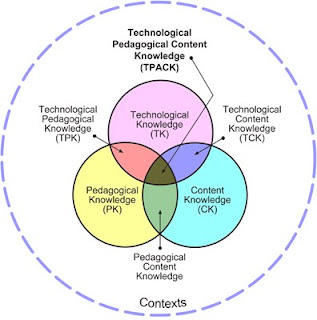
Figure 1 (source: http://www.tpck.org/) shows the TPACK framework. This framework is based on the PCK model of Lee Shulman (1986; in Koehler & Mishra, 2009), which stands for Pedagogical Content Knowledge. Nowadays technology gets more and more integrated in eduacation, therefore theachers also need knowledge of technologies (Technological knowledge). Figure 1 shows four cirkels, three in the middle (which are connected) and one big one which stands for the context. Accept from knowledge about Pedagogies and Technologies a teacher also needs ofcourse knowledge about the content. All those aspects - and their connection/integration with each other - are visible in the model/framework (figure 1). Each of them is presented with a cirkel, it is clear that those cirkels cross each other. As said, the bigger cirkel around the three cirkels stand for the context.

Explaining this framework:

This model is presented from a teachers-view (not a student-view). A teacher has to have knowledge about the content he or she is teaching: Content knowledge. For example, when a teacher teaches Geography and he/she wants to teach the students about Vulcano's, he/she has to have knowledge about Vulcano's.

A teacher also need to have knowledge about Pedagogies. A teacher chooses a certain pedagogical approach to teach the student: Pedagogical knowledge. A few examples of pedagogical approaches are discussed in earlier posts on this blog (like: Inquiry learing, Competence-based learning, Problem-based learning, etc.) But also knowing how to refer to the students prior knowledge, how to use resources, planning the lessons, classroom management, etc.

To support the teacher in teaching, there are different kinds of technologies available, which can be very usefull. The third inner cirkel stand for the knowledge that a teacher has to have about technologies, to be able to use those (as an addition and/or support) during his/her lectures (classes). A teacher needs skills to operate certain technologies, the ability to learn and adapt to new technolgies and a functional understanding of technologies. So a teacher need Technological knowledge. For example: different kinds of technology can be used to support a teacher (support the pedagogical approach or provides flexibility), like: using computers in the classroom, using internet, e-mail (students can mail their questions or their assignments), using the digital Whiteboard, using computer management systems (such as Blackboard) using GPS, using laptops, etc.

In practice those three cirkels are all contected to each other. The following ways:

PCK: Pedagogical content knowledge --> how particular aspects of the subject (course) are organized, adapted and represented for instruction

TPK: Technological Pedagogical Knowledge --> How pedagogies change because of the use of technologies

TCK: Technological Pedagogical Knowledge --> How subject matters (the content) changes because of the use of technologies

Finally, in the center you reach TPACK: Technological Pedagogical Content Knowledge. All the aspects of teachers knowledge are integrated. So TPACK is an understanding in which interaction among content, pedagogy and technolgoy is reached. In practice it is not so easy to reach this point. Every aspect has to be well considered and integrated with each other. This is a difficult job to do. There is not one single answer about which combinations works best, for example; some technologies can be really helpfull with a certain content or a particular pedagogical approach, but can be really not-usefull with another approach or content. Sometimes teachers need to use a particular technological support, which they have to fit in with the existing content, this can be difficult. But sometimes the content is declared and then a fitting pedagogical approach is chosen as well as a technological support that is really helpfull in teaching the specific content.

By integrating technological pedagogical and content knowledge, a flexible learning environment can be created. The context does also declare the flexibility of the learning envirnoment. Although it is not simple to reach TPACK, teachers should try (and should be supported) in reaching this point. Professionalisation of teachers can help providing in reaching TPACK.


Koehler, M., J. & Mishra, P. (2009) What is Technological Pedagogical Content Knowledge? Contemporary Issues in Technology and Teacher Eduaction, 9(1), pp. 60-70.

dinsdag 13 oktober 2009

Combination of the topics flexibility, pedagogical approaches and the use of technology

The last few weeks I posted information on this weblog, mainly about three main-topics: Flexibility, Pedagogical and Technology. But what about the combination of those three aspects? When chosen a pedagogical approach there are several ways of flexibility that can occur in the approach. And there are several ways to support this flexibility in a certain approach with technology. It is good to think about the different aspects and how you can combine them in such a way that the best outcome is reached.

Reflecting on those three topics, I think they have to be in balance to gain a postive effect of flexibile learning supported by technology. But it does make a difference what you consider to be the starting point. It is possible to first choose the technology and then the Pedagogical approach and the flexible aspects about it. But this can be considerd to be a technological push, because the technology is the starting point and not put in as the support of the content and the approaches. Technology can be helpfull, but I think it is important that the technology does not become the purpose instead of the support. (unless learning to work with a certain technology is ofcourse the goal itself). I believe it is (in most cases) better to first decide about your content and your pedagogical approach before chosing which technology could support your approach best. Then, or even before that, you can decide on the flexibility of the chosen pedagogical approach. Some approaches are more easily flexible than others. The available technology can support the choices of flexibility. For instance, when you don't have computers which you can use (for example during a course) or when students don't have computers at home you can not decide on flexibility to follow a course on the internet wiht a webcam. Or you can not give students het oppertunity to email their homework, because they don't have internet-access at home (or no computer). Those are all aspects to consider when you are planning to make a course more flexible, supported by technology.

As said, in some pedagogical approaches it is easier to implement flexibility and technology as in others. One of the other students (who is taking the course) wrote on her weblog the use of webquest for inquiry learning. It is a flexible way for learners to find their own information on the webquest and learn from it. But it still has its limits, the amount the learner can learn depends on how the programmer has programmed the webquest. But the learner can find his/her own way in it. (and this way the teacher still can decide what the learners should be learning from the webquest) Using a webquest is a nice technology to support the inquiry learning approach. But it is always wise to consider what the additional value of the webquest is. Would the learner have learned less when you did not use a webquest?
Was the starting point the webquest ("we want to do something with technology, lets make a webquest") or the content and the learning approach? ("this inquiry learning approach fits very good with a webquest, and the content does also, lets make a webquest") It is important to be aware of this difference when chosing a technological support and implementing flexibility in a course.

I think it is interesting to see the connection of those three topics. They need each other, but they exsist separatly: there are many pedagogical approaches (as mentioned before), many ways of flexibility (also mentioned before) and different ways to use technology in course. But I believe the strength is in combining them by letting technology support a certain pedagogical approach (it goes for every approach) in which a flexibility approach can be implemented. Example:
1. First choose a Pedagogical approach
2. Secondly think how you can make this flexible (as well as for the teacher as the learner)
3. Thirdly think about how technology can support the flexible aspect in the pedagogical approach.
This is the way how I think the three topics should be combined, based on the previous information of those (seperated) topics. It can be done differently of course. It is possible to first decide that you really want to make use of webquest and then think: "hmm inquiry learning would then be a good approach", or you can first decide that you really want to make the course more flexible and therefore decide that using a webquest can support the flexible aspect because students can work on it in their own pace/time, in that case it would almost be a logical step to use inquiry learning as pedagogical approach. So it is possible to use a different strategie (and follow-up) to combine those three topics. But they are still combined with each other, no doubt about that.

woensdag 7 oktober 2009

Interesting article on collaborative learning supported by technology

You can find an article on technology-supported collaborative learning through the link:

http://www.springerlink.com/content/d553240441v47335/fulltext.pdf

This paper provides trends of recent interest in technology-supported collaborative learning in higher education by reviews of research conducted in the last 20 years on the application of technology in support of collaborative learning in higher education. The review focuses primarily on studies that use Internet-based technologies and social interaction analysis. The review provides six sets of observations/recommendations regarding methodology, empirical evidence, and research gaps and issues that may help focus future research in this emerging field of study.

Resta, P., & Laferriere, T. (2007). Technology in support for collaborative learning. Educational psychology review, 19(1), 65-83.

dinsdag 6 oktober 2009

Pedagogical approaches

There are several kinds of pedagogical approaches that can be supported by a Course Management System, such as the Blackboard which is used at the University of Twente. Here I described five kinds of pedagogical approaches, including the way they can be supported in a Course Management System such as Blackboard.

Inquiry Learning
Inquiry learning emphasizes active learning, encouraging students to ask questions,formulate hypotheses, and experiment to test them (Järvelä , Veermans & Leinonen, 2008). A starting point for the process of inquiry is creating a context for a study project in order to help students understand why the issues in question are important and worthwhile to investigate, and to personally commit to solving the problems being investigated. Further, an essential aspect of inquiry is to set up questions or problems that guide the process of inquiry. By creating a working theory of their own, students can systematically use their background knowledge and make inferences to expand their understanding. The phase of searching and sharing new information helps students to become aware of their inadequate presuppositions or background information. A critical condition for progress is that students focus on improving their theory by generating and setting up subordinate questions.

The 6 points which we have presented during the lectur on 30-09-09
1. Natural curiosity of the students
2. requires well-developed questioning skills
3. the students have to collect the information, then they can start asking questions
4. a period of time is necessary to let the students get used to/familiar with the topic (for example: two weeks)
5. Essential question (basis of the inquiry!) --> question relevant to the lives of the students (either now or in the future)
6. subquestions: students work collaborative to write subsidary questions (they get inspired by each others main questions)

The context of the problem could be provided in a CMS, such as BlackBoard:
- providing a video or a text with pictures.
- Searching information can be supported by providing links to important information.
- The CMS can provide in information about searching skills,
- The CMS can also provide questions to guide the process.
- Sharing information can be supported by a discussion forum and sharing files within this forum through attachments.

Problem Based-Learing
Problem-based learning (PBL) is an instructional approach in which students in small groups engage in an authentic, ill-structured problem (Belland, Glazewski & Richardson, 2004). Normally PBL starts with presenting a case to a group of students.
Th students have to formulate and analyze the problem relying on their prior knowledge and put forward their initial hypothesis through a phase of brainstorming. Next, the students elaborate on and evaluate the proposed hypothesis concluding on what they already know and what they need to know more about. This will result in the students’ learning issues. Within the group of students, the students report about their findings and they reflect on what they have learned during the process.

Problem-based learning can be supported by a Course Management System, such as Blackboard, in different ways. A few ideas:
- A "problem" (essential question) could be provided on the CMS. This makes sure that all the students (also at distance) can see what the problem is.
- Students can put their essential questions and their subquestions on the CMS, this way other students have easily acces.
- It is important that the outputs of different steps in the process are
recorded, a practical way of doing this is thru a CMS.
- the process information can be stored in a database (so people can look back to it later)
- For collecting information the problem-based learning process can supported by providing different possible sources for gathering information can be provided to support the students in their search process. (hints on searching information)
- Group communication is an important aspect, this is also possible with a CMS, for example with a forum (groupdiscussions can take place at a forum)
- reports can be submitted thru the CMS (like Blackboard).

Collaborative learning
Collaborative learning is in general an instruction technique where students are placed in small groups or pairs while working on a specific task and are encouraged to communicate with their partner by sharing ideas and working towards a common goal (Day, Boatman, Kowollik, Espejo, McEntire & Sherwin, 2007).

A few ideas about how collaborative learning can be supported by a CMS:
- Chat boxes can be integrated in a CMS, both voice chat with microphones and text chat is possible. (this is more expanded way of group communication as a forum is)
- Also the use of webcams within the system can enhance communication at distance
- Sharing of files and pictures trhu an CMS
- Language translator (when people who are together in one group, speak different languages)
- A forum, for groupdiscussion as well as within the collaborative learning group as with other students or tutors.
- a way of submitting assignments

Workplace learning
Learning can also take place at the workplace itself. Informal learning is one of the main aspects of workplace learning. A few ways of informal learning (lecture Fisser, 2009):
1. asking help from peers/colleagues
2. observing others (colleagues, other employees)
3. corridor conversations
4. trial & error
5. Getting help from colleagues who work longer at the workplace (have more experiences, or even are pointed out as a mentor)

Besides informal learning, formal learning can also take place at the workplace. Formal learning can include workshops and training about the learning aspects. Although bringing into practice what people have learned during workshops and other forms of fofmal learning seem to be hard in practice. Therefore informal learning takes a large part of the workplace learning.

Workplace learning can be supported by a Course Management System, such as Blackboard, in different ways. A few ideas:
- Providing information, so every colleague can see it and act to it (can be appointments or agreements or other interesting facts)
- a way of communicating: thru the previous mentioned forum, or chatboxes.
- a way of sharing ideas with each other, by posting messsages
- a online workplace can be implemented. Where employees can put their work and get feedback from colleagues (peers)
- a way of communicating with a mentor (or colleague with more experiences)the mentor can also place common tips & trics that are usefull to know on the CMS.


Competence-based learning
Within competence-based learning it is al about gainig new competences and evaluating the competences that are already there. Competencies are a combination of
complex cognitive and higher-order skills, highly integrated knowledge structures, interpersonal and social skills, attitudes and values. Within the competence-based approach it is important that the learning situation is authentic (Kirschner, 2001). The student must be able to identify with the role of an innovative knowledge worker. Also of importance is the authenticy of the reviews and assessments. By involving experts from the professional domain in the assessment this can be reached. Therefore the assessment is executed just like in the real professional domain. Competency-based curricula are based upon a network of interrelated organized
competencies relating to what a professional can and must do. The idea of developing professional comptences within competence-learning is that students learn to apply knowledge in professional situations (Weert, 2002)

Competency-based learning can be supported by a Course Management System (CMS) in different ways:
- The CMS can be used to provide information about certain methods and other background information.
- A CMS can be used to provide information on different possible problems. Students can then for themselves decide on which competencies to develop
- In a CMS review and assessment can be integrated --> (a system can be established that monitors and assesses students' (in)competencies. It includes traditional teacher controlled evaluation(co-assessment) procedures as well as methods for self- and peer-assessment by the students themselves)
- In the CMS students can for example make an overview of the activities they completed
- In the CMS students can describe their process in a digital portfolio.

This were just a few examples of pedagogical approaches and how they can be supported by a CMS, such as BlackBoard. There are a lot of options with a CMS. In practice not all options are being used (commonly only for providing information, giving assignments and the oppertunity to submit assignments), but it is good to know that there are a lot of options, which can be a proper support for different kinds of pedagogical approaches. It has become clear that in almost every approach, CMS can have a usefull place.


Belland, B.R., Glazewski, K.D., & Richardson, J.C. (2004). A scaffolding framework to support the construction of evidence-based arguments among middle school students. Journal of the learning sciences, 13(3), 337-386.

Day, E. A., Boatman, P. R., Kowollik, V., Espejo, J., McEntire, L. E., & Sherwin, R. E. (2007). Collaborative training with a more experienced partner: Remediating low pretraining selfefficacy in complex skill acquisition. Human factors, 49(6), 1132-1148.

Fisser, P. (2009) Lecture on Pedagogical approaches. University of Twente

Järvelä, S., Veermans, M., & Leinonen, P. (2008). Investigating student engagement in computer supported inquiry: a process-oriented analysis. Social psychology education, 11, 299-322.

Weert, T.J., van (2002). ICT-rich and Competency Based Learning in Higher Education. In: A.J. Kallenberg & M.J.J.M. van de Ven (Eds.), The New Educational Benefits of ICT in Higher Education: Proceedings. Rotterdam: Erasmus Plus BV, OECR.

dinsdag 29 september 2009

Interesting articles on a pedagogical approach: collaborative learning

On http://tecfa.unige.ch/tecfa/publicat/dil-papers-2/Dil.7.1.14.pdf
you will find a publication of the article: What do you mean by collaborative learning? by Pieter Dillenbourg, (1999). It is free to download this article, and you don't have to be logged in on the university libary. This article is part of the book: Collaborative-learning: Cognitive and Computational Approaches. (pp.1-19).
You should read it, because it gives a very clear overview on topics concerning collaborative learning. Dillenbourg explains the variety of meanings for learning, the variety for scales, the variety of meanings for collaboration and gives attention to different theories of collaboration.

Another article, which I can recommand considering collaborative learning, is: An online collaborative environment. By Kevin Curran (2002). But you have to be logged in at the university libary. You can find this article thru ERIC. However, you can have a free preview on: http://www.springerlink.com/content/x3am1xrej06964h6/fulltext.pdf?page=1
In the article Curran (2002) describes an online collaborative learning environment that supports communication, sharing knowledge and having interaction in different ways. This article is interesting because it provides you with practical knowledge of the pedagogical approach collaborative learning.

Dillenbourg, P. (1999). What do you mean by collaborative learning? Collaborative-learning: Cognitive and Computational Approaches. Oxford: Elsevier.
Curran, K. (2002). An online collaborative environment. Education and Information Technologies, 7(1), 41–53.

vrijdag 25 september 2009

Assignment 1: Flexibility

There are many ways of flexible learning (Collis & Moonen, 2001). Flexible learning is not only about distance learning, there are a lot other ways for flexible learning. Here I give a few examples of different kinds of flexible learning and their advantages and disadvantages.

Six examples of flexibility:

• Tempo/pace of studying
• Topics of the content
• Conditions for participation
• Instructional organisation of learning (assignments, monitoring)
• Language to be used during the course
• Time & place where contact with instructor and other students occurs

Tempo/pace of studying
Flexible learning can be related to time (Collis & Moonen, 2001). One way of offering this kind of flexibility, is to give the learner the opportunity to choose his or her own tempo in learning/studying. When flexibility is offered in the tempo/pace, this means that a student can study on his or her own speed. Some students study faster than others, by making time/pace flexible the opportunity is giving to students to choose their own speed in which they feel comfortable.

Advantages and disadvantages
An advantage of letting students choose their own speed of studying is that they can adjust their studying to their own needs. When they need more time, or more explaining they can get it, while other (faster) students are able to finish their study sooner. By letting students decide about their own study tempo, some students will probably have a bigger chance on succeeding because they can take more time to study. The faster-students will probably get less bored, because they can go on with the next chapter or assignments, they don't have to wait for other students to be as far as they are.

Advantages:
• Learner can adjust the tempo of studying to his or her wishes;
• Learner can make his or her own learning plan of how fast he or she wants to study;
• Learner can take the time that he/she needs.
• Stimulating the motivation of the learner, because he/she does not have to wait for fellow students
• Stimulating the motivation of the learner, because the learner can choose the tempo that he/she likes
• Stimulating learners who don't have much time to study, to finish the study in their own tempo and at the time they want.

A disadvantage of adjusting tempo/pace of studying to the learner, is mainly for the organisation of the course (study) and the teacher/lector/instructor. It is more difficult to let every student choose their own speed of studying, because while one student is still working/reading/studying at chapter 1, another student can already be at chapter 10. It is almost not possible to teach those two students at the same time. Therefore the schedule will have to change, or each student should get educated personally. This takes a lot of time. It is possible when there are only a few students in a group, but not with complete study groups.

Disadvantages:
• Because all students work in a different tempo there is less chance on group-interaction;
• Organizational problems, because lecture content is difficult to schedule when every student is working in a different tempo;
• The instructor can't prepare for specific content, because the learner decides what chapter (or which part) they are;
• The instructor must always be available for personal help, because of the different tempo's of the learners

Three flexible learning topics that influence flexibility in tempo/pace are; flexibility in time (for starting and finishing a course), in time (for submitting assignments and interacting within the course) and moments of assessment (Collis& Moonen, 2001). When students can chose their own speed of studying they will not be finished all at the same time, therefore there should be more than one moment of assessment, so students can end their course earlier or sooner. This also has influences on submitting assignments and interacting within the course. When a student is still at chapter 1, it is not possible for this student to submit an assignment of chapter 10. The other way around; it is not practical if a student who is much further in the literature (or other study aspects) to still have to submit an assignment of chapter 1 or have interaction about this with an instructor/teacher. This student’s needs interaction with an instructor/teacher about chapter 10.

Topics of the Course
According to Collis & Moonen (2001) flexibility can be related to the content of the course. The learner can be given a choice what he/she wants to learn. What content is relevant for the learner? What does the learner wants to achieve with the topics of the course? Those are questions that can be answered by the learner. The topics of the course can be adjusted to the needs of the learner, this is flexible. Learners can give ideas for topics they want to study, which is an example of flexibility. But the instructor can also let learners choose from a range of topics, this way it is a bit less flexible (but still flexible) and it is more practical for the instructor.

Advantages and disadvantages
There are some advantages in flexibility in the topics of the course a well as disadvantages. At first it sounds nice that the learner get the possibility decide what topics he/she thinks are relevant and interesting, but there are some problems that occur.

Advantages:
• Learners can adjust the content of the course to their own interests
• It becomes clear what learners want to learn, and what they don’t want to learn
• Learners can focus on practical use of the course content (for example in their work)
• Stimulating for the motivation of the learner, because they can decide for themselves what they want to learn
• An advantage for the instructor is a motivated class of students.

Disadvantages:
• Time consuming for the instructor, because he/she has to adjust the content to the wishes of the learners (different learners).
• When the learners of one group have different interests, the instructor has to make different assignments, give different feedback, explain different content; this is also time consuming and difficult organizatory (individual contact with the learners).
• Not all students want (and are able to) decide what they want to learn.
• When not all learners of one group work on the same topic, group sessions are difficult as well as giving feedback to other learners, or having group discussions.
• When learners study different kind of topics it is difficult to compare them fairly and to asses (fairly) what they have achieved.

Conditions for participation
Flexibility can also be related to entry requirements (Collis & Moonen, 2001). When the conditions for participation are fixed, this is inflexible. When learners can decide what the conditions for participation of a certain course are, the conditions for participation are flexible. This means that when the learner thinks he/she can attain a course, he/she can attain the course. The learner can base this decision on the fact that he/she has certain prior knowledge; did achieve required prior knowledge thru a similar course or study, or experiences in the working field.

Advantages & disadvantages

Advantages:
• Learners can attain in different courses, when they can decide their own conditions of participation. (When a learner thinks he/she is able to attain in a course, he/she can try to attain in the course).
• Learners may have less study delay when they can choose their own conditions for participation in a course.
• Different kind of learners, with different backgrounds can work with each other and learn from each others experiences (prior knowledge).

Disadvantages:
• Not all learners are able to (and want to) decide whether they have enough prior knowledge to attain in a course.
• Working in groups with other learners can be difficult, because the learners have different prior knowledge.
• It is time consuming for the instructor, because he/she has to adjust to the prior knowledge of the learners. Some learners will have more prior knowledge than others; the instructor will have to explain some aspects more to some learners than to others. Instructions can be different for learners with different backgrounds and feedback must be adjusted in a way that every learner understands the feedback.
• When learners have a different start level, it is discussable if assessing them should be adjusted to their starting level. But it is difficult to asses if all learners have a different level. In that case it is possibly better to not adjust the assessment; the requirements of passing the course are in that case fixed (and not flexible).

Instructional organisation of learning (assignments, monitoring)
Flexibility can also be related to instructional approach and resources (Collis & Moonen, 2001). One way of doing so is to let learners choose the instructional organisation of a course. If learners have influence in the way the type and the amount of assignments, in the study material and the way lecture’s are given, than the instructional organisation is flexible. When the instructor decides about the type and amount of assignments, which study material may be used, the structure of the lectures and how those are given (teacher telling, students listening or group discussions or individually or self-study, etc.) than the instructional organisation of the course is considered inflexible.

Advantages & Disadvantages

Advantages:
• Learners have influence in their learning process, by deciding which type and amount of assignments they want and how they want to get educated (self-study, teacher telling, working in groups, individual attention from the instructor/teacher, etc.)
• Learners can choose the instructional way in which they can learn best.
• Learners can get more motivated when they have decided the instructional aspects themselves, instead of getting obligated to an instructional form by the instructor of the course.

Disadvantages:
• There will be organizational problems, when every learner can decide the instructional organization for him/her self. (Not everyone will choose the same material, assignments and instruction approach).
• When not all students want to get educated the same way, it is difficult for an instructor to fulfil all the wishes of the learners.
• It is time consuming for the instructor, to make and give feedback on different assignments and to monitor the learners on different ways.
• It is possible to let learners choose the way they want to learn, but to keep the same assessment for all learners. But it is also possible to adjust the assessment to the chosen instructional organisation (more flexible), in that case the assessments have to be adjusted to every learner, this is also very time consuming.

Language to be used during the course
Another way to increase the flexibility, is to give the learner the opportunity to do the study in the language he/she prefers (Collis & Moonen, 2001). It is flexible when the learners can choose the language course in which the lectures are given, or/and the language in which the assignments are handed in, which language the feedback is provided and in which language other communication is held. There is inflexibility in language when the instructor decides in which language the course is provided, in which language assignments should be handed in, in which language the feedback is provided and in which language the assessment takes place.

Advantages & disadvantages

Advantages:
• Learners speak and write usually better in their own language (or the language of their choice).
• Learners will understand the lectures better if those are held in their own language (or the language of their choice) en they will understand feedback better.

Disadvantages:
• Arranging lectures for a group with students who haven chosen different languages to get educated in is very difficult. Group lecture are no longer possible, the learners have to get educated individually or in small groups of learners who have chosen the same language.
• Group interaction will be minimal when every learner provides an other language.
• It is very time consuming for the instructor when the lectures must be given in different languages, the assignments must be in different languages, giving feedback in different languages and assessing in different languages.
• Some languages are not possible to give the course in, when there is no instructor who speaks the language.

Time & place where contact with instructor and other students occurs
The last example of ways of flexibility that can be provided in courses is related to delivery and logistics (Collis & Moonen). As said in the short introduction, distance learning is not the only flexible way of learning, but it is one of them. Therefore finally a short overview of distance learning according to the time and place where contact with the instructor and other students takes place; this can be flexible. When time and place are flexible the learner can choose if he/she wants to follow the course at a distance or prefers face-to-face sessions, or combining self-study, distance education and face-to-face sessions. When the instructor decides on time and place, than this is inflexible for the learners.

Advantages & disadvantages

Advantages:
• Learners can plan their own schedule, which can be very handy for them because it offers the opportunity, for example; to work during the day and study (follow the course, for example on the internet or on video’s, with literature, assignments, etc.) in the evening.
• Learners can decide where they want to do the course. If they prefer to do this at home, than that is possible. This is especially an advantage for the learners who have to travel a lot to go to a course.
• Learners can interact with other learners in online discussions or they can make an appointment with each other when they have time for it. They can decide when and where themselves.

Disadvantages:
• When studying at distance there is more self-direction and more self-motivation needed, not every learner is capable of this.
• Not all learners want to decide for themselves when they have to study, some learners prefer it more to have someone telling them (for example an instructor) when the have to study. It helps them if they have to go to lectures, in stead of staying at home and follow lectures online.
• The instructor has less control whether a learner is participating in a course, when the learner can decide where and when he/she wants to study. To see if the learner makes any progress, there have to be strict assignments, assessments and deadlines, which make the course more inflexible.